Custom Search

Monday, November 16, 2009

DESCRIPTION: Nikon Coolpix S550 and S600


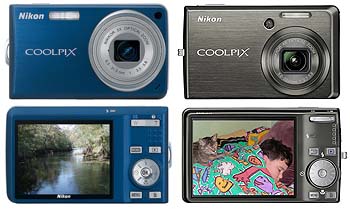
And two new 10-megapixel Nikon Coolpix cameras

For those who want 10 megapixel resolution and are willing to pay a bit more for some cool features, Nikon inroduced the Coolpix S550 and S600. Both are very small and light and fit into any pocket. The US$229 Coolpix S550 has a 5X optical zoom, letting you get that much closer. The US$299 S600 has a larger 2.7-inch LCD, is among the quickest cameras around, has optical vibration reduction, and a 4X 28-112mm optical zoom that lets you shoot wide angle, and you get to go as close as 1.2 inches with the macro.

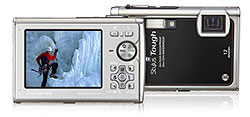
DESCRIPTION: Olympus Stylus Tough-8000


Tough, waterproof, shockproof, freezeproof flagship camera now with 12 megapixel, dual image stabilization

As part of its Winter 2009 lineup, Olympus introduced the 12-megapixel Stylus Tough-8000 as the new flagship of its renamed line of shockproof, freezeproof, crushproof, dustproof and waterproof (up to 33 feet) cameras. This is a camera you can truly take, and use, anywhere. Available in Black, silver and blue.

Ricoh GXR Interchangeable Unit Digital Camera


Today Ricoh GXR Camera($549) is official, which is an interchangeable unit camera system featuring the world’s smallest and lightest digital camera with the ability to change lenses.lenses and sensors are added by using a slide-in mount system to attach camera units to the body. The system takes a novel approach by offering interchangeable slide mount ‘lens units’ – sealed modules containing both optics and sensor, meaning it can switch from a large (APS-C) 12 MP CMOS with a fast prime lens to a tiny 10 MP CCD (with a 24-70mm lens). Other features include die-cast magnesium body, 3-inch LCD, 86 MB built-in memory and SD/SDHC memory cards slot.

D-link DCS 910


Features
The D-Link 10/100 Fast Ethernet Internet Camera (DCS-910) connects to a wired network to provide remote high-quality video recording. With its compact and sleek design, the DCS-910 is a low-cost Internet camera ideal for your home or small business. The DCS-910 connects quickly and easily to your existing 10/100 Fast Ethernet network, allowing you to steam high-quality MJPEG to your computer.
REMOTE VIEWING IN HIGH DETAIL
Access and control the DCS-910 using any Java-enabled browser. Take snapshots or record directly from the Web browser to a local hard drive. The included D-ViewCam� 2.0 software allows you to view and manage up to 32 camera feeds easily and hassle-free. The DCS-910 records and streams MJPEG for detailed video monitoring and playback. Keep an eye out on your kids, pets, home, or office remotely by simply logging onto the DCS-910 using a Web browser from any computer with Internet access.
EASY NETWORK SETUP
The DCS-910 adheres to the Universal Plug & Play (UPnP�) specification, which allows for automatic camera detection and addition to networks. Once recognized by your network, the DCS-910 can be accessed and viewed from �My Network Places� as a device on your network. You can then stream the feed from the DCS-910 to any compatible digital media player (such as those in the D-Link MediaLounge line of products) to view from the comfort of your living room.
Specifications
Camera Specifications
Sensor: VGA �� CMOS
Lens: 4.57mm, F1.9
Minimum Illumination: 1.0 Lux @ F1.9
3A Control: AGC, AWB, AES
Electronic Shutter: 1/60(1-50) ~ 1/15,000 Sec
Video Formats Supported
MJPEG Compression
JPEG for Still Image
Remote Management
D-ViewCam 2.0 Allows for Remote Management and Control of up to 32 Internet Cameras
Web-based
Resolution
Up to 15fps at 640x480
Up to 30fps at 320x240
Up to 10fps at 160x120
Connectivity
Wired (10/100 Fast Ethernet)
Networking Protocols
IPv4, ARP, TCP, UDP, ICMP
DHCP Client
NTP Client
DDNS Client
SMTP Client
FTP Client
HTTP Server
DNS Client
PPPoE
LLTD
Standards
IEEE 802.3
IEEE 802.3u
IEEE 802.3x Flow Control
Security
Default Admin ID/Password Admin
LEDs
Link/Power
Temperature
Operating: 32�F to 104�F (0�C to 40�C)
Storage: -4�F to 158�F (-20�C to 70�C)
Operating Humidity
20%-80% RH Non-condensing
Power
External Power Supply: 5V, 2.5A
Consumption: 4.5 Watts Max
Physical Description
Dimensions (W x D x H) Item: 2.8 x 4.3 x 1.5in
Packaging: 8.2 x 10.8 x 2.7in Weight
Item: 0.5 lbs
Packaging: 2.0 lbs

Sunday, November 15, 2009

Canon PowerShot SD780 IS Digital Camera


The great-looking SD780 IS is no superficial beauty; it has the features and performance to match its stunning aesthetics.
Quite possibly the most fashionable of the point-and-shoot cameras out right now, the sleek, solid-colored Canon PowerShot SD780 IS ($280 as of 7/10/2009; available in gold, red, black, and silver) isn't just a looker. It also performs very well, with great image quality, a powerful flash, nice high-ISO shots in low light, a great selection of scene modes, and excellent optical image stabilizationThis is a very slim-and-stowable camera, measuring just 0.72 inches thick and 3.4 inches wide; it's about the size and thickness of a half-deck of playing cards. The metal lens casing is surrounded by a plastic, but durable, body--both are the same color--and the contoured edges of the camera add to its slick looks.

In PC World Test Center jury evaluations, the 12-megapixel PowerShot SD780 IS netted an overall image quality score of Very Good, earning some of the highest marks we've seen for a point-and-shoot this year for its lack of distortion, its color accuracy, and its image sharpness.

And that's just in well-lit conditions. In hands-on informal tests, I was amazed at the color accuracy and lack of noise in low-light shots at high ISO levels. The manual ISO settings (ranging from ISO 80 to ISO 1600) are complemented by a special ISO 3200 scene mode. There is definitely some visible speckling at ISO 3200 and ISO 1600, but low-light images taken at these settings with the flash turned off are impressively bright, crisp, and colorful.

Battery life isn't terrible, but we've seen much better. In PC World Test Center battery tests, the PowerShot SD780 IS took 261 shots on a single charge of its lithium ion battery. That was enough to earn a battery life score of Good, but far short of the 300-plus shots now fairly common in today's pocket cameras.

Other than that, this camera really has only a few drawbacks, and none of them hurt much. The 2.5-inch-diagonal LCD screen on the back is a bit small by today's standards, but it's bright and vibrant enough to see in practially every lighting condition (you also get an old-school optical viewfinder above the LCD--a nice touch). The zoom range is a bare-bones 3X optical, with a shrimpy wide-angle end (33mm to 100mm). Because it's such a slim, sleek, and pocket-friendly camera, the control buttons are fairly small and may prove difficult for the meaty-handed to use. And as usual, the plastic doors that cover the HDMI port, A/V out ports, and battery feel like they could tear off really easily.

Despite the slim frame, the SD780 IS is a bit more advanced than your basic point-and-shoot, but it's still definitely for casual shooters. You don't get many manual controls, other than ISO settings, white-balance settings, and exposure compensation values. However, the collection of shooting modes and scene selections in the camera (20 in all) make up for that quite a bit.

At first glance, you won't see that many scene modes; most of them are "hidden" from the main scene selection navigation and are accessible only by pressing the Display button once you've navigated all the way to the right of the scene menu. It's a minor irritation that could have been obviated just by letting you repeatedly press the right navigational button to scroll through all the available scene modes.

In addition to old standbys such as Portrait, Sunset, Fireworks, and Snow, some really creative scene options are in the mix. Two of the best are Canon's Color Accent and Color Swap modes. Color Accent lets you isolate a single color in an otherwise black-and-white shot, while Color Swap lets you change all instances of one color in your shot to another color. They're fun to use and work well, and are even accessible in the SD780 IS's movie mode (which shoots 720p HD movies at 30 frames per second; clips are saved as .mov files).

To complement its HD video chops, the SD780 IS also has another nice feature: an HDMI-out port for viewing images and videos on an HDTV (but no included HDMI cable). In addition to its 720p HD mode, the SD780 IS also shoots 640-by-480 and 320-by-240 standard-definition clips, both at 30fps. A minor disappointment is that you can't zoom in and out while filming.

Canon has taken the concept of a fashionable, easy-to-use point-and-shoot that also performs well and knocked it out of the park. The SD780 IS is sure to turn heads and keep casual photograpers happy with its image quality and fun features. It's the best-looking point-and-shoot camera we've seen in 2009, and it's one of the best basic point-and-shoots, period. The trade-off is that you don't get much in the way of manual controls, and the $280 price tag is geared more to its style and performance than its specs.

(Just started looking for a digital camera? See "How to Buy a Digital Camera.")

Panasonic Lumix DMC-FS25


With a wide-angle Leica lens, very good image quality, a big LCD, and excellent battery life, this is a well-rounded pocket camera.
Offering a wide-angle Leica lens, very good image quality, a big LCD, and excellent battery life, the Panasonic Lumix DMC-FS25 is a great, well-rounded pocket cam. It does cost a shade more than the competition (the suggested retail price is $250), but we've seen it available around the Web for closer to $200A few distinguishing characteristics make it a phenomenal buy if you can find it at that $200 price point, as well as a great value for $250. One of them is Panasonic's Intelligent Auto mode, which consists of six in-camera features working in tandem: optical image stabilization, ISO optimization, automatic scene selection, backlight correction, red-eye correction, and face detection.

Rather than having the user dive into the menus to choose this mode, Panasonic has put a dedicated Intelligent Auto button right next to the shutter button to turn it on. It's a very handy feature, and Intelligent Auto did a good job of selecting the right settings in my informal tests. Part of its success is the excellent optical image stabilization, which kept the image crisp both when zoomed in to the max and when I shook the camera around dramatically. Adding to the camera's list of key draws is its wide-angle chops, thanks to a 5X optical-zoom Leica lens that reaches from 29mm to 145mm.

A great feature, especially for a camera in this price range, is the AF Tracking mode, which lets you lock in on a moving subject and keep it in focus as the subject (or the photographer) moves around. In my informal tests, it worked best with bright, solid-colored objects; coupled with the optical image stabilization, it's very helpful for those who want to shoot sports or action scenes.

Another nice touch is the inclusion of a few unique selections among the 21 scene modes. You still get the old standbys, such as Portrait, Sports, Scenery, Sunset, and Fireworks, but rare options such as Pinhole (which mimics the effects of a pinhole camera), Film Grain (which applies a gritty black-and-white filter), and Photo Frame (which puts teen-centric, partytime borders around your shots) are also in the mix.

Other in-camera features include a burst mode that shoots about 2 images per second, manual and pre-set white balance selections, and seven different "color" modes that apply effects such as sepia tone and vivid colors.

In PC World Test Center jury evaluations, the Lumix DMC-FS25 earned one of the best image-quality scores in our group of about a dozen $200-range cameras. Color accuracy, exposure quality with the flash turned on, and image sharpness were all notable strong suits, earning it an overall image quality score of Very Good.

Battery life is also excellent. The Panasonic Lumix DMC-FS25 netted 320 shots on a single charge of its rechargeable lithium ion battery, for a battery life score of Very Good. Most other cameras in the $200 price range topped out at about 250 shots per charge.

Those who share Steve Jobs's disdain for physical buttons will meet their nemesis in this camera. The Lumix DMC-FS25 does its thing with a combination of buttons, switches, and a four-way navigational mini-joystick. That makes most functions a no-brainer to find, but the mini-joystick (which also doubles as one-touch access to exposure compensation, the flash, the self-timer, and the macro mode) is a bit small and finicky to use if you've got big hands.

Besides the joystick, four buttons adjoin the big, bright 3-inch-diagonal LCD on the back of the camera: one to access the camera modes, one that offers different looks for the viewfinder, one for the menus, and delete. There's also a toggle switch above the buttons to jump between capture and playback modes. Another toggle switch for powering the camera on and off rests on the top of the unit; next to that is the shutter button and zoom ring, as well as the aforementioned Intelligent Auto button.

To avoid shutter lag, the Lumix DMC-FS25 will capture shots instantly as long as you autofocus before snapping. If you don't autofocus first and simply press the shutter button, you'll get about a second of shutter lag.

The Lumix DMC-FS25 also records standard-definition video, but like many point-and-shoots, you can't zoom in and out while filming. Video is captured at three different settings as .mov files, all at 30 frames per second: 848-by-480 clips in WVGA mode, 640-by-480 clips in VGA mode, and 320-by-240 clips in QVGA mode.

It's an understatedly good-looking camera, too, although the brushed-metal faceplate looks a bit more solid than it feels. On the upside, the camera is a bit lighter than it looks, but, again, has a slightly hollow feel.

As with any tech purchase, it's best to try the Panasonic Lumix DMC-FS25 before you buy it, thanks to the love-it-or-hate-it mini-joystick that you use to access most of the menu functions. That's really the only main drawback of this camera, which offers a wide-angle lens, fun features, a huge LCD screen, and great battery life for the price. If you can find the Lumix DMC-FS25 around the $200 price point, it provides excellent value for the money.

Canon PowerShot SD990 IS


The SD990 IS performs beautifully, but the plasticky build and control dial feel chintzy for the price.
As a fan of Canon's Digital Elph cameras, I was a bit disappointed by the current flagship model of the series, the 14.7-megapixel PowerShot SD990 IS. That may be surprising, given that this camera dominates most other point-and-shoot cameras in terms of image qualityBut I expect a camera priced at around $400 to feel solid. The SD990, which has a plastic body rather than the titanium casing of its predecessor (the PowerShot SD950 IS), feels a bit cheap. This, coupled with a handful of other shortcomings, chips into the camera's excellent performance.

The image quality is indeed outstanding: The PowerShot SD990 IS netted a score of Superior in the PC World Test Center jury evaluations, producing some of the best results for color accuracy, lack of distortion, and exposure quality we've ever seen in a point-and-shoot. However, the plasticky build and some design choices hinder its overall score.

Canon released the SD990 alongside the 10-megapixel PowerShot SD880 IS, its less-expensive (and excellent) Digital Elph sibling. The SD880, though, feels as solid as a rock, despite the fact that it, too, has a plastic chassis.

Both of these PowerShots have a control dial on the back of the camera, complementing the four-way navigation pad. The dial makes scrolling through menu options extremely fast, but, on the SD990, it jiggles enough to make it feel flimsy.

What's more, that dial is suprisingly difficult to use, with its secondary function--switching between program mode and manual mode--unhandy at best. When I was dialing between modes, I often couldn't make it land on the one I wanted. On the SD880, I never had such problems with the control dial.

Another gripe I have with the SD990 is the focal range: At 36mm to 133mm, the 3.7X optical zoom lens is not a true wide angle. When I compared it to the SD880's 28mm-to-112mm, 4X optical zoom, I started wondering why Canon skimped on the wide-angle with this "higher-end" model.

So what features make the SD990 pricier than the SD880, other than the inflated megapixel count? For starters, it has an optical viewfinder. It also has a wider set of manual controls, including aperture and shutter-speed settings, flash exposure compensation, and manual focus. In Quick Shot mode, the SD990 continuously adjusts for exposure and focus (even when you remove your finger from the shutter button entirely), thus eliminating shutter lag almost completely. The SD990's optical image stabilization is also slightly more powerful than the SD880's. And it's available in black!

Like the SD880, the SD990 boasts Canon's Digic 4 image processor, which, along with increased speed, hosts a number of upgrades. These include Servo AF (continual focus adjustment for moving objects), "Intelligent Contrast" (which increases dynamic range), and a fun face-detection timer. About the timer: You set up the camera, hit the shutter button, and, as soon as the camera detects an additional face in the frame (that is, once you jump into the scene), it starts a two-second countdown before snapping three photos. And enough time elapses between shots to change positions, making this feature possibly even more fun than a photo booth. Compared to the "smile detection" functions used by its competitors, the face-detect timer wins hands down.

Despite the improvements on its predecessor, I can't help but feel that Canon dropped the ball a bit with the SD990, especially when price is factored in. Unless you simply can't live without an optical viewfinder or extensive manual controls, I see little reason to spend the extra bucks on the SD990. I'd go for the $270 PowerShot SD880--and put the savings into your vacation fund.